
Improving the “Schedule” and “Maps” feature on My Tel-U Mobile Application
Overview
MyTel-U is Telkom University’s internal super-app designed to support students’ daily academic activities. Among its core features is the class schedule, which helps students check their daily lectures and manage their academic routines.
Responsibility
End-to-end Redesign
Type
Education Technology
Role
Product Designer
Date
January, 2023
Background
“Eh, jadwal kelas hari ini apa aja sih?”
“Ke Gedung Kuliah Umum lewat mana ya?”
These are common questions among Telkom University students. Although MyTel-U already provides features to support students’ daily campus activities, the current experience does not fully help students access class information quickly and effortlessly. Students still rely on friends or external applications to manage their schedules and find classroom locations, showing a gap between the available features and students’ actual needs.
Problem
After conducting an online survey regarding students’ schedule experience, three main problems were identified:
1. Our current schedule feature is located inside the Attendance feature.
This placement creates additional cognitive effort for users to locate the schedule information. Therefore, despite the feature already being available, many users still struggle to access it.
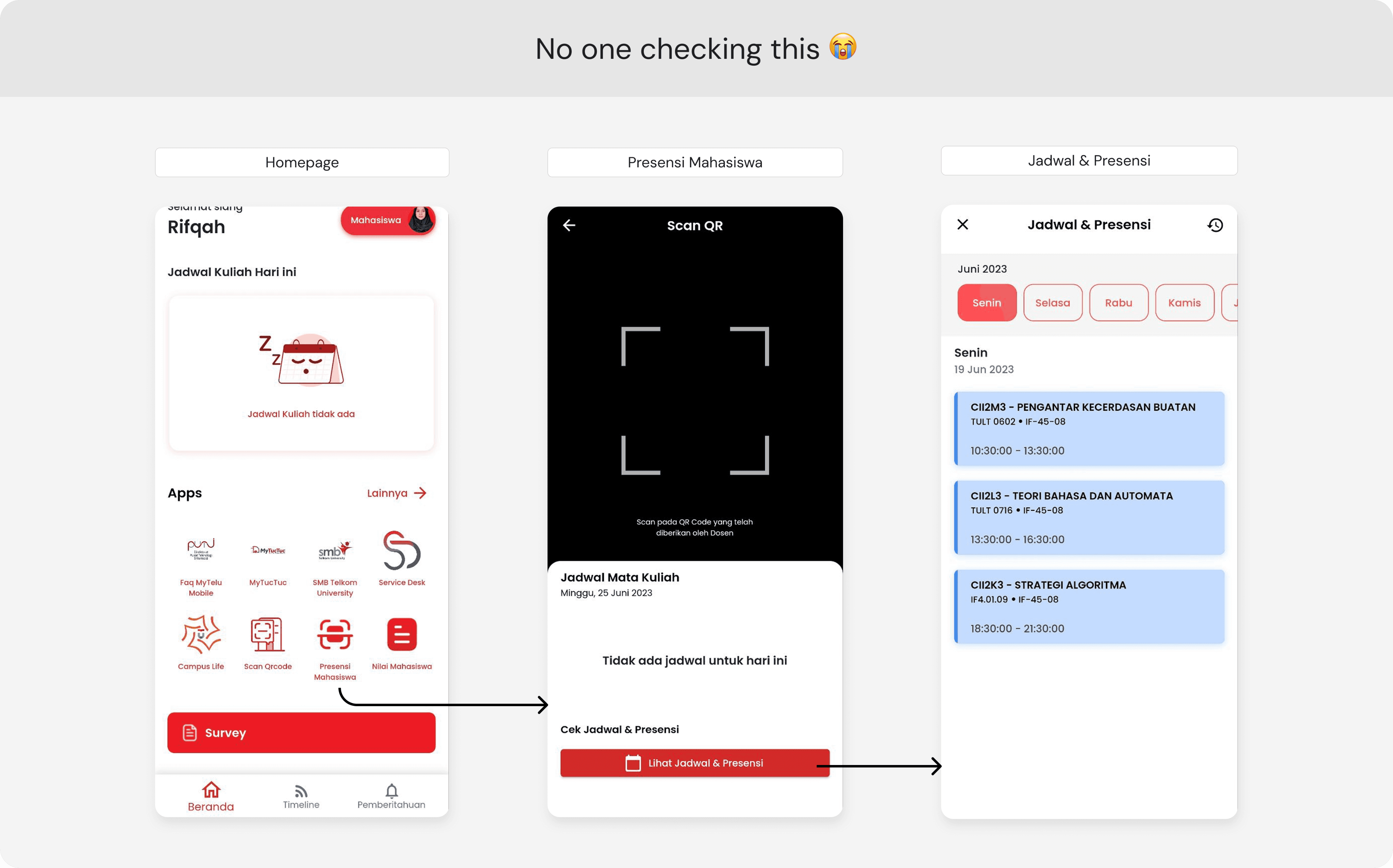
2. The classroom location information is limited to the building name only, without additional details.
The provided classroom information limited to the building name and room number without additional guidance, making it challenging for students to find unfamiliar locations.

3. The schedule feature only displays default class schedules.
The current schedule only displays default class schedules, while students with additional campus activities still rely on external applications for planning
Project Goals
The challenge in this project was to improve three different user needs within a single experience: helping students quickly access their schedules, manage their academic activities within one app, and support them in finding classroom locations.
In that sense, the project goal is...
How might we provide a more accessible and efficient experience in MyTel-U to help students access their schedules, manage academic activities, and find classroom locations easily?
Solution
To address the identified problems, I redesigned the Schedule and Maps features to improve accessibility, discoverability, and efficiency. The solution focuses on reducing the effort required to access important campus information, enabling students to manage their academic activities and navigate campus more seamlessly within MyTel-U.
1. Improve Feature Discoverability Through Homepage
My approach is to improve feature discoverability by providing key access points directly on the homepage, allowing users to access essential information faster and with less effort.


2. Simplify Schedule Access Flow


Problem Solved ✨
Since the homepage is the most frequently visited screen, key Schedule entry points were placed directly on the homepage to improve feature discoverability. This redesign enables students to quickly access their schedules with fewer steps and less effort.
3. Custom Schedule Feature (New)
Previously, the app only displayed default class schedules. With this improvement, students can add other academic-related activities, such as teaching assistant duties, laboratory assistant schedules, or other campus activities.


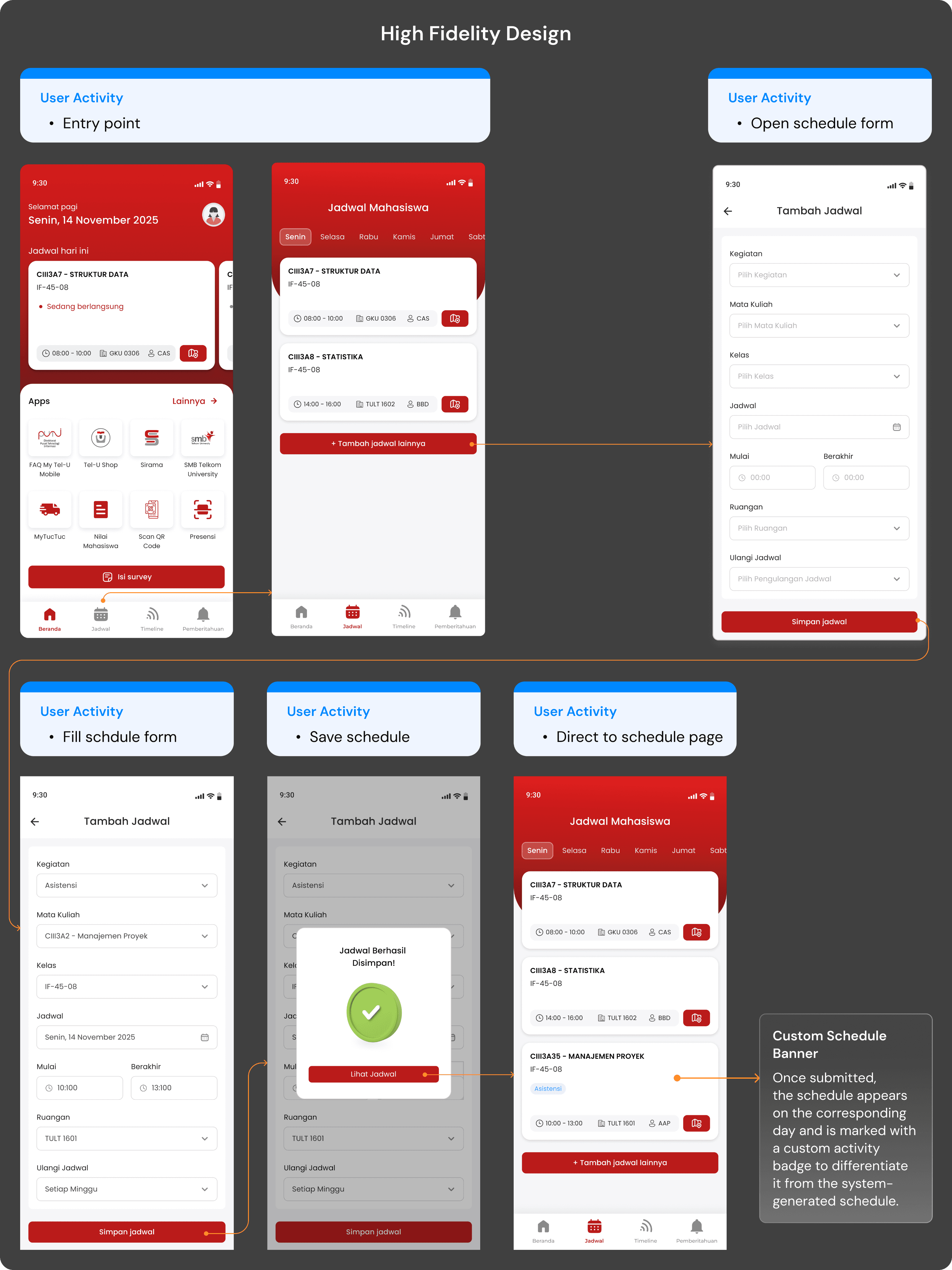
Problem Solved ✨
The Schedule feature has evolved from a passive schedule viewer into a personal schedule management tool, enabling students to organize their academic activities in one place.
4. Improve Campus Navigation Through Maps Feature (New)
The feature provides classroom location previews, including building photos to help students identify destinations more easily. Additionally, the live navigation feature guides users directly to their destination, making campus navigation simpler and more efficient.


Problem Solved ✨
Students no longer have to rely on external map applications or ask others for directions. The integrated Maps feature provides building information and real-time navigation, creating a more seamless campus experience within MyTel-U
Prototype
Experience the redesigned features and user flows through the interactive prototype below. Please check the sidebar on the left side of the prototype page, where several starting points, user scenarios, and goals are provided to guide your testing experience
Lesson Learned
✨
This project changed the way I understand users’ needs. Initially, I focused on what new features could be added, but research showed me that users often need a better experience with existing features rather than more functionality. The real challenge was ensuring that the feature was accessible, effective, and aligned with users’ behaviors and needs.
✨
Designing the schedule form taught me that every input component should be chosen based on the type of data and the user's task, not simply because it looks good. This led me to explore Material Design more deeply, helping me understand not only which components to use, but also the reasoning behind them and how they create familiar, consistent, and intuitive experiences for mobile app.

